  __            _ _
 / _| ___  _ __(_) |
| |_ / _ \| '__| | |
|  _| (_) | |  | | |
|_|  \___/|_|  |_|_|
MyBatis 学习笔记
##是什么

官方定义:MyBatis 是一款优秀的持久层框架,可以理解为 MyBatis 就是对 JDBC 访问数据库的过程进行了封装,简化了 JDBC 代码,解决 JDBC 将结果集封装为 Java 对象的麻烦,使开发者只需要关注 SQL 本身,而不需要花费精力去处理例如注册驱动、创建 connection、创建 statement、手动设置参数、结果集检索等 JDBC 繁杂的过程代码。
MyBatis 本是 Apache 的一个开源项目 iBatis,2010 年这个项目由 Apache software foundation 迁移到了 Google Code,并且改名为 MyBatis。2013 年 11 月迁移到 Github。(很多包名仍叫 iBatis)
具体使用时,MyBatis 通过 xml 或注解的方式将要执行的各种 statement(statement、preparedStatemnt)配置起来,并通过 Java 对象和 statement 中的 SQL 进行映射生成最终执行的 SQL 语句,最后由 MyBatis 框架执行 SQL 并将结果映射成 Java 对象并返回。
架构图
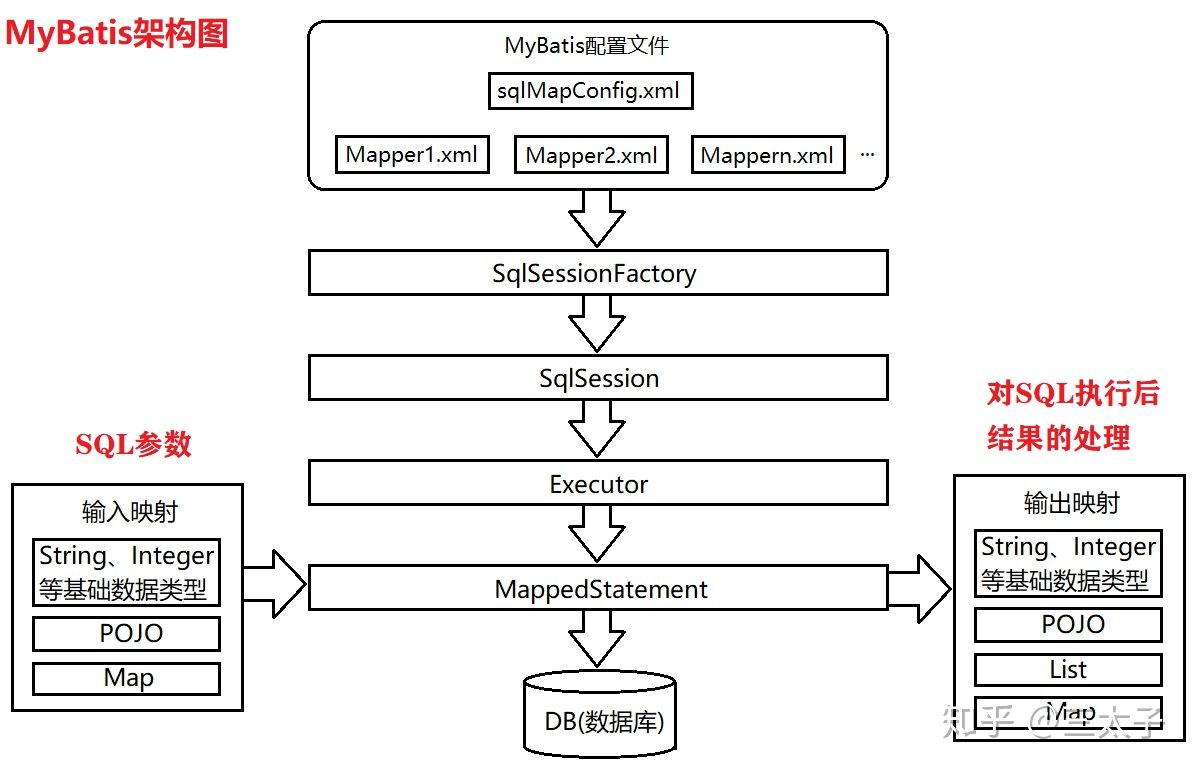
如上图所示是MyBatis架构图:
- mybatis-config.xml 是Mybatis的核心配置文件,通过其中的配置可以生成SqlSessionFactory,也就是SqlSession工厂;
- 基于 SqlSessionFactory 可以生成 SqlSession 对象;
- SqlSession 是一个既可以发送 SQL 去执行,并返回结果,类似于 JDBC 中的 Connection 对象,也是 MyBatis 中至关重要的一个对象;
- Executor 是 SqlSession 底层的对象,用于执行 SQL 语句;
- MapperStatement 对象也是 SqlSession 底层的对象,用于接收输入映射(SQL 语句中的参数),以及做输出映射(即将 SQL 查询的结果映射成相应的结果)。
##优缺点
优点
- Mybatis 对 JDBC 对了封装,可以简化 JDBC 代码;
- Mybatis 自身支持连接池(也可以配置其他的连接池),因此可以提高程序的效率;
- Mybatis 是将 SQL 配置在 mapper 文件中,修改 SQL 只是修改配置文件,类不需要重新编译;
- 对查询 SQL 执行后返回的 ResultSet 对象,Mybatis 会帮我们处理,转换成 Java 对象。
缺点
- SQL 语句仍需要自行编写,编写工作量大;
- 数据库移植比较麻烦,比如 MySQL 数据库变成 Oracle 数据库,部分的 SQL 语句需要调整;
- JDBC 方式可以用用打断点的方式调试,但是 MyBatis 不能,需要通过 log4j 日志输出日志信息帮助调试,然后在配置文件中修改。
##两种使用方式
首先pom加入依赖:MyBatis以及数据库驱动。
xml<?xml version="1.0" encoding="UTF-8"?> <project xmlns="http://maven.apache.org/POM/4.0.0" xmlns:xsi="http://www.w3.org/2001/XMLSchema-instance" xsi:schemaLocation="http://maven.apache.org/POM/4.0.0 http://maven.apache.org/xsd/maven-4.0.0.xsd"> <modelVersion>4.0.0</modelVersion> <groupId>org.example</groupId> <artifactId>mybatis-learn</artifactId> <version>1.0-SNAPSHOT</version> <properties> <maven.compiler.source>18</maven.compiler.source> <maven.compiler.target>18</maven.compiler.target> <project.build.sourceEncoding>UTF-8</project.build.sourceEncoding> </properties> <dependencies> <dependency> <groupId>mysql</groupId> <artifactId>mysql-connector-java</artifactId> <version>8.0.29</version> </dependency> <dependency> <groupId>org.mybatis</groupId> <artifactId>mybatis</artifactId> <version>3.4.5</version> </dependency> </dependencies> <!-- 注意加入以下配置,使项目能够访问java下的xml作为配置文件 --> <build> <resources> <resource> <directory>src/main/java</directory> <includes> <include>**/*.xml</include> </includes> </resource> </resources> </build> </project>
创建 MyBatis 配置文件 config.xml,文件名可自定义。
xml<?xml version="1.0" encoding="UTF-8" ?> <!DOCTYPE configuration PUBLIC "-//mybatis.org//DTD Config 3.0//EN" "http://mybatis.org/dtd/mybatis-3-config.dtd"> <configuration> <!-- 配置MyBatis运行环境 --> <environments default="development"> <environment id="development"> <!-- 配置JDBC事务管理 --> <transactionManager type="JDBC"/> <!-- POOLED配置JDBC数据源连接池 --> <dataSource type="POOLED"> <property name="driver" value="com.mysql.cj.jdbc.Driver"/> <property name="url" value="jdbc:mysql://foril.space:3306/MyBatis_learn"/> <property name="username" value="root"/> <property name="password" value="WCX990824wcx"/> </dataSource> </environment> </environments> <mappers> <!-- <mapper resource="edu/ssdut/mybatis_learn/mapper/AccountMapper.xml"/> <mapper resource="edu/ssdut/mybatis_learn/repo/AccountRepo.xml" /> --> </mappers> </configuration>
原⽣接⼝
- 为每个实体类创建
xxxMapper.xml,定义管理该类对象的 SQL。
xml<!-- AccountMapper.xml --> <?xml version="1.0" encoding="UTF-8" ?> <!DOCTYPE mapper PUBLIC "-//mybatis.org//DTD Mapper 3.0//EN" "http://mybatis.org/dtd/mybatis-3-mapper.dtd"> <mapper namespace="edu.ssdut.mybatis_learn.mapper.AccountMapper"> <!-- 不需要加.xml --> <insert id="save" parameterType="edu.ssdut.mybatis_learn.entity.Account"> insert into t_account(username, password, age) values(#{username}, #{password}, #{age}); </insert> </mapper>
- namespace 通常设置为⽂件所在包+⽂件名的形式。
- insert 标签表示执⾏添加操作。
- select 标签表示执⾏查询操作。
- update 标签表示执⾏更新操作。
- delete 标签表示执⾏删除操作。
- id 是实际调⽤ MyBatis ⽅法时需要⽤到的参数。
- parameterType 是调⽤对应⽅法时参数的数据类型。
- 在全局配置⽂件
config.xml中注册AccountMapper.xml
xml<mapper resource="edu/ssdut/mybatis_learn/mapper/AccountMapper.xml"/>
- 调用原生接口。
javaString resource = "config.xml"; InputStream inputStream; try { inputStream = Resources.getResourceAsStream(resource); } catch (IOException e) { throw new RuntimeException(e); } SqlSessionFactory sqlSessionFactory = new SqlSessionFactoryBuilder().build(inputStream); try (SqlSession session = sqlSessionFactory.openSession()) { String stmt = "edu.ssdut.mybatis_learn.mapper.AccountMapper.save"; Account account = new Account("foril", "123456", 23); // 生成session后,用session完成语句执行 session.insert(stmt, account); session.commit(); // 记得要commit }
Mapper代理实现⾃定义接⼝
- ⾃定义接⼝,定义相关业务⽅法。
javapublic interface AccountRepo { public int save(Account acc); public int update(Account acc); public int deleteById(long id); public List<Account> findAll(); public Account findById(long id); }
- 创建
xxxMapper.xml,定义 SQL 语句。
MyBatis 框架会根据规则⾃动创建接⼝实现类的代理对象,即可以用代理对象的方法调用实际 SQL。规则:
- Mapper.xml 中 namespace 为接⼝的全类名。
- Mapper.xml 中 statement 的 id 为接⼝中对应的⽅法名。
- Mapper.xml 中 statement 的 parameterType 和接⼝中对应⽅法的参数类型⼀致。
- Mapper.xml 中 statement 的 resultType 和接⼝中对应⽅法的返回值类型⼀致。
xml<!-- AccountRepo.xml --> <?xml version="1.0" encoding="UTF-8" ?> <!DOCTYPE mapper PUBLIC "-//mybatis.org//DTD Mapper 3.0//EN" "http://mybatis.org/dtd/mybatis-3-mapper.dtd"> <mapper namespace="edu.ssdut.mybatis_learn.repo.AccountRepo"> <insert id="save" parameterType="edu.ssdut.mybatis_learn.entity.Account"> insert into t_account(username, password, age) values(#{username}, #{password}, #{age}); </insert> <!-- 像save、update这类语句默认返回更新行数,不需要resultType --> <update id="update" parameterType="edu.ssdut.mybatis_learn.entity.Account"> update t_account set username = #{username},password = #{password},age = #{age} where id = #{id} </update> <delete id="deleteById" parameterType="long"> delete from t_account where id = #{id} </delete> <!-- 注意一定要传入范型类型,而不是List类型 --> <select id="findAll" resultType="edu.ssdut.mybatis_learn.entity.Account" > select * from t_account </select> <select id="findById" parameterType="long" resultType="edu.ssdut.mybatis_learn.entity.Account"> select * from t_account where id = #{id} </select> <!-- 多参数,不需要传入paramType,利用param1, param2这样,注意下标从1开始 --> <select id="findByNameAndAge" resultType="edu.ssdut.mybatis_learn.entity.Account"> select * from t_account where username = #{param1} and age = #{param2} </select> </mapper>
- 在
config.xml中注册AccountRepo.xml。
xml<mapper resource="edu/ssdut/mybatis_learn/repo/AccountRepo.xml" />
- 生成代理对象,之后使用代理对象完成业务操作。
javaString resource = "config.xml"; InputStream inputStream; try { inputStream = Resources.getResourceAsStream(resource); } catch (IOException e) { throw new RuntimeException(e); } SqlSessionFactory sqlSessionFactory = new SqlSessionFactoryBuilder().build(inputStream); SqlSession session = sqlSessionFactory.openSession(); // !!!第二种方式与第一种方式的差异就是利用session打开mapper,用mapper进行操作 AccountRepo mapper = session.getMapper(AccountRepo.class); // Account aa = new Account(4, "aa", "321321", 22); // if(mapper.update(xk)==1) { // System.out.println("更新成功"); // }else { // System.out.println("更新失败"); // } mapper.save(new Account("wtf", "wtfwtfwtf", 22)); // 多参数 System.out.println(mapper.findByNameAndAge("foril", 23)); session.commit(); session.close();
总的来说,两种使用方式的不同就在于原生方式需要直接使用 session 对象,执行传入的配置位置对应的 SQL;而代理 Mapper 则是利用 session 拿到 Mapper 对象,因为 Mapper 对象声明了关于实体对象的各种操作,则可以直接调用Mapper的对象的方法。
##级联查询
当查询的结果由多个表级联得到时,需要将结果与对应 Java 实体类中的域关联起来,这时候需要在Mapper中配置 resultMap,将查询结果中的域与实体类关联。
其中重要的映射标签有:
association:一个复杂类型的关联;许多结果将包装成这种类型;collection:一个复杂类型的集合。
xml<!-- 一个Student有一个classes域,存放班级信息 --> <mapper namespace="com.southwind.repository.StudentRepository"> <resultMap id="studentMap" type="com.southwind.entity.Student"> <id column="id" property="id"></id> <result column="name" property="name"></result> <!-- association --> <association property="classes" javaType="com.southwind.entity.Classes"> <id column="cid" property="id"></id> <result column="cname" property="name"></result> </association> </resultMap> <select id="findById" parameterType="long" resultMap="studentMap"> select s.id,s.name,c.id as cid,c.name as cname from student s,classes c where s.id = #{id} and s.cid = c.id </select> </mapper>
xml<!-- 一个Classes下有students域,存放多个学生 --> <mapper namespace="com.southwind.repository.ClassesRepository"> <resultMap id="classesMap" type="com.southwind.entity.Classes"> <id column="cid" property="id"></id> <result column="cname" property="name"></result> <collection property="students" ofType="com.southwind.entity.Student"> <id column="id" property="id"/> <result column="name" property="name"/> </collection> </resultMap> <select id="findById" parameterType="long" resultMap="classesMap"> select s.id,s.name,c.id as cid,c.name as cname from student s,classes c where c.id = #{id} and s.cid = c.id </select> </mapper>
##逆向⼯程
MyBatis 框架需要:
- 实体类;
- ⾃定义 Mapper 接⼝;
- Mapper.xml。
传统的开发中上述的三个组件需要开发者⼿动创建,逆向⼯程可以帮助开发者来⾃动创建三个组件,减轻开发者的⼯作量,提⾼⼯作效率。
如何使⽤
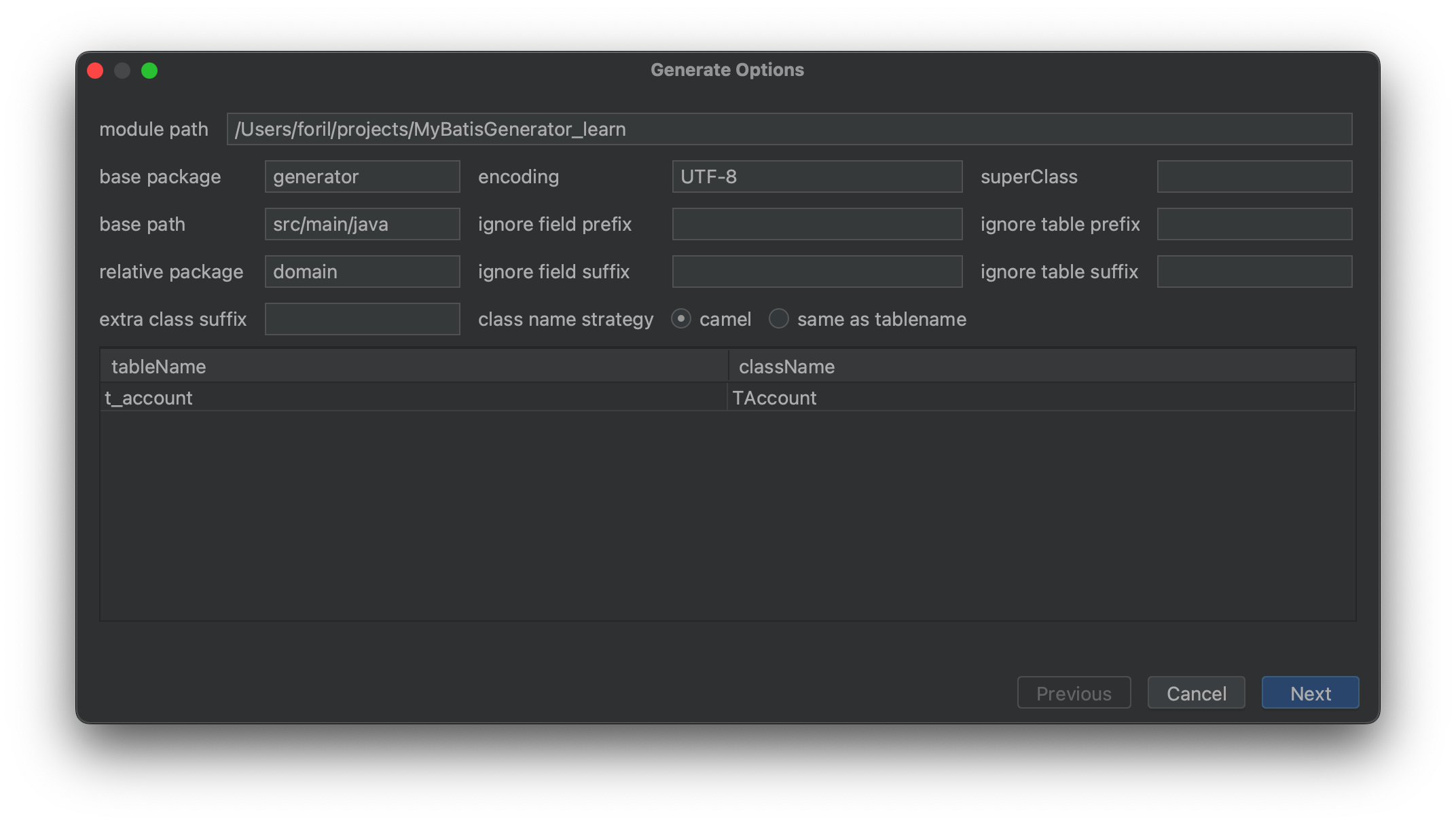
MyBatis Generator,简称 MBG,是⼀个专⻔为 MyBatis 框架开发者定制的代码⽣成器,可⾃动⽣成 MyBatis 框架所需的实体类、Mapper 接⼝、Mapper.xml,⽀持基本的 CRUD 操作,但是⼀些相对复杂的 SQL 需要开发者⾃⼰来完成。
实际使用中我们可以利用 IDEA 插件,通过 GUI 直接从数据表生成实体类以及对应mapper,只需要在 config.xml 下完成 mapper 配置即可使用自动生成的 SQL 方法。
##延迟加载
延迟加载也叫懒加载、惰性加载,使⽤延迟加载可以提⾼程序的运⾏效率,针对于数据持久层的操作,在某些特定的情况下去访问特定的数据库,在其他情况下可以不访问某些表,从⼀定程度上减少了 Java 应⽤与数据库的交互次数。
查询学⽣和班级的时,学⽣和班级是两张不同的表,如果当前需求只需要获取学⽣的信息,那么查询学⽣单表即可,如果需要通过学⽣获取对应的班级信息,则必须查询两张表。不同的业务需求,需要查询不同的表,根据具体的业务需求来动态减少数据表查询的⼯作就是延迟加载。
举例来说,我们通过级联查询,可得到学生对象,其域中包括了他的班级对象,但如果我们只在代码中使用了学生对象的信息,不需要班级对象,MyBatis 会自动判断,不查询班级信息,也就少发送一次 SQL。
这需要我们通过简单配置打开延迟加载,在 MyBatis 配置文件下加入:
xml<configuration> <settings> <!-- 打印sql --> <setting name="logImpl" value="STDOUT_LOGGING"/> <!-- 打开延迟加载 --> <setting name="lazyLoadingEnabled" value="true"/> </settings> </configuration>
##缓存
使⽤缓存可以减少 Java 应⽤与数据库的交互次数,从⽽提升程序的运⾏效率。⽐如查询出 id = 1 的对 象,第⼀次查询出之后会⾃动将该对象保存到缓存中,当下⼀次查询时,直接从缓存中取出对象即可, ⽆需再次访问数据库。
⼀级缓存
SqlSession 级别,默认开启,并且不能关闭。
操作数据库时需要创建 SqlSession 对象,在对象中有⼀个 HashMap ⽤于存储缓存数据,不同的
SqlSession 之间缓存数据区域是互不影响的。
⼀级缓存的作⽤域是 SqlSession 范围的,当在同⼀个 SqlSession 中执⾏两次相同的 SQL 语句时,第⼀
次执⾏完毕会将结果保存到缓存中,第⼆次查询时直接从缓存中获取。需要注意的是,如果 SqlSession 执⾏了 DML 操作(insert、update、delete),MyBatis 必须将缓存清空以保证数据的准确性。
⼆级缓存
Mapper 级别,默认关闭,可以开启。
使⽤⼆级缓存时,多个 SqlSession 使⽤同⼀个 Mapper 的 SQL 语句操作数据库,得到的数据会存在⼆ 级缓存区,同样是使⽤ HashMap 进⾏数据存储,相⽐较于⼀级缓存,⼆级缓存的范围更⼤,多个 SqlSession 可以共⽤⼆级缓存,⼆级缓存是跨 SqlSession 的。⼆级缓存是多个 SqlSession 共享的,其作⽤域是 Mapper 的同⼀个 namespace,不同的 SqlSession 两次执⾏相同的 namespace 下的 SQL 语句,参数也相等,则第⼀次执⾏成功之后会将数据保存到⼆级缓存中,第⼆次可直接从⼆级缓存中取出数据。
打开方式
- config.xml 配置开启⼆级缓存
xml<settings> <!-- 打印SQL--> <setting name="logImpl" value="STDOUT_LOGGING" /> <!-- 开启延迟加载 --> <setting name="lazyLoadingEnabled" value="true"/> <!-- 开启⼆级缓存 --> <setting name="cacheEnabled" value="true"/> </settings>
- Mapper.xml 中配置⼆级缓存
xml<cache></cache>
- 实体类实现序列化接⼝
javapublic class Account implements Serializable { private long id; private String username; private String password; private int age; }
##动态 SQL
使⽤动态 SQL 可简化代码的开发,减少开发者的⼯作量,程序可以⾃动根据业务参数来决定 SQL 的组 成。MyBatis 动态 SQL 实际上就是在应该编写 SQL 语句的位置利用标签完成不同条件下动态 SQL 的生成,常用标签有:
- if
- where
- choose
- when
- trim
- set
- foreach
使用示例:
xml<select id="findByAccount" parameterType="com.southwind.entity.Account" resultType="com.southwind.entity.Account"> select * from t_account where <if test="id!=0"> id = #{id} </if> <if test="username!=null"> and username = #{username} </if> <if test="password!=null"> and password = #{password} </if> <if test="age!=0"> and age = #{age} </if> </select>
xml<select id="findByAccount" parameterType="com.southwind.entity.Account" resultType="com.southwind.entity.Account"> select * from t_account <where> <if test="id!=0"> id = #{id} </if> <if test="username!=null"> and username = #{username} </if> <if test="password!=null"> and password = #{password} </if> <if test="age!=0"> and age = #{age} </if> </where> </select>
xml<select id="findByAccount" parameterType="com.southwind.entity.Account" resultType="com.southwind.entity.Account"> select * from t_account <where> <choose> <when test="id!=0"> id = #{id} </when> <when test="username!=null"> username = #{username} </when> <when test="password!=null"> password = #{password} </when> <when test="age!=0"> age = #{age} </when> </choose> </where> </select>
xml<select id="findByAccount" parameterType="com.southwind.entity.Account" resultType="com.southwind.entity.Account"> select * from t_account <trim prefix="where" prefixOverrides="and"> <if test="id!=0"> id = #{id} </if> <if test="username!=null"> and username = #{username} </if> <if test="password!=null"> and password = #{password} </if> <if test="age!=0"> and age = #{age} </if> </trim> </select>
xml<update id="update" parameterType="com.southwind.entity.Account"> update t_account <set> <if test="username!=null"> username = #{username}, </if> <if test="password!=null"> password = #{password}, </if> <if test="age!=0"> age = #{age} </if> </set> where id = #{id} </update>